Kudobox
Collect testimonials your customers actually finish writing
A collection form, an approval dashboard, and an embeddable Wall of Love widget. $19 a month for unlimited testimonials. The limited tier collects 25 a month.
- Every testimonial arrives with the sentence your customer agreed to, and the places they allowed
- Each one is read before you publish it: personal details, named third parties, promised results
- Publish it as written, or with those parts removed — Kudobox never rewords it
No password. You get a private dashboard link right after this — bookmark it, that's your login.
Where do your testimonials live right now?
One click and the rest of this page answers your case instead of everybody's. Your answer is counted and nothing else is — no name, no cookie.
What your visitors see
The widget renders your approved testimonials in this grid, on your own site. Shown here with placeholder text — there are no invented customers on this page.
Your customer's words appear here, in their own voice, exactly as they wrote them.
A longer one, to show that the card grows with the text it holds instead of cropping it. Nothing is truncated and nothing is rewritten.
A shorter one still fills its card, because the grid sizes rows to the tallest card in them.
The rating is optional. Where a customer leaves one, it sits above their words in bronze.
The grid reflows on its own: three columns on a desktop, one on a phone, no CSS from you.
Where a customer pastes a YouTube, Vimeo or Loom link, their video plays right here in the card.
The card with the laurel border is one you marked as featured. The Kudobox mark appears under the wall on the limited tier and comes off on Pro.
Try the card right here
Change the words and the card changes with them. It runs the same markup your visitors would see. Nothing here is saved or sent anywhere.
Setup took four minutes and the wall matched our site without any CSS work.
How it works
Send one link
Your collection page asks for a rating, the story, an optional photo and an optional video link. Nothing else, and no account for them to create.
Approve what you keep
Every testimonial lands as pending. You approve, feature or delete it. Nothing reaches your site until you say so.
Paste one line of code
The widget renders the approved ones on your own site, in the grid above, responsive out of the box.
Two screens, and you have seen the whole product: the page your customer opens, and the page where you decide what survives.
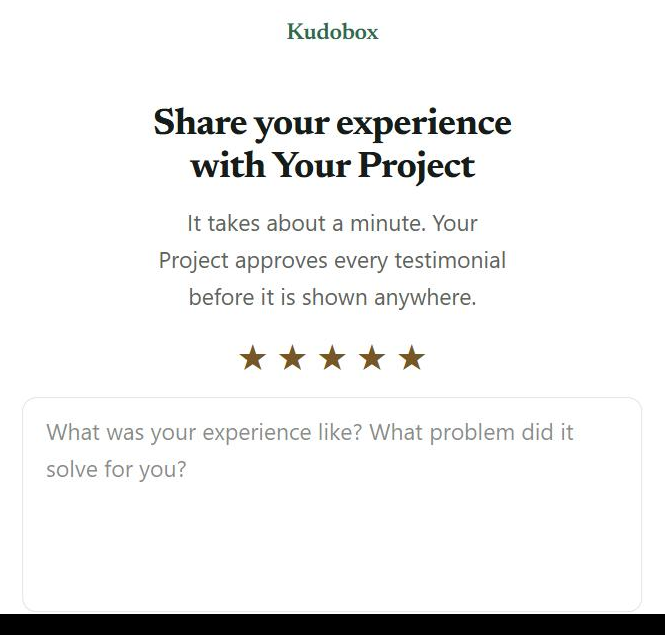
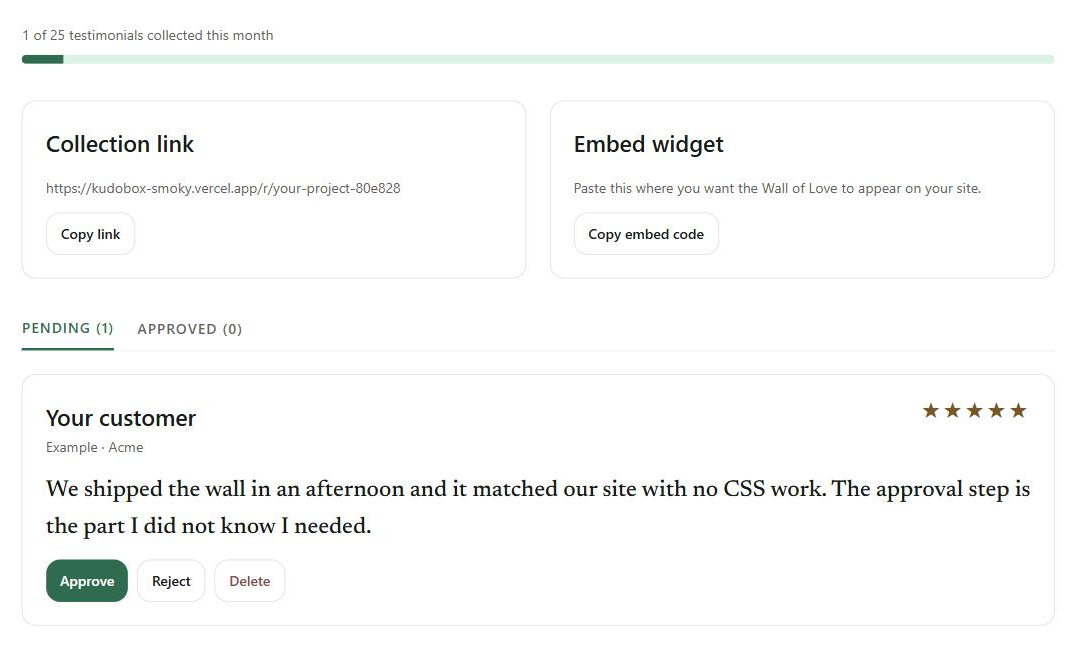
The approval step is the whole product
Every testimonial waits for you. You see who wrote it, what they said and the rating they left, and you decide whether it goes on your site at all.
Two things to copy, in one place
The dashboard holds your collection link and your embed code, so both live in the one page you already have bookmarked.
Questions people ask before paying
- Do my customers need an account?
- No. They open a link, write, and send. Nothing to install, nothing to log into.
- Where does the wall live?
- On your own site. You paste one script tag and one empty div where you want it, and the widget fills it.
- Can I edit what a customer wrote?
- You cannot rewrite it — not through the dashboard, not through the API. You can ask Kudobox to take things out: a phone number, a diagnosis, a named third party, an insult. It replaces that span with [removed] and shows you exactly what it took, and if the suggestion changes a single word of the rest it is thrown away instead of saved. What they wrote is kept as it arrived and both versions are in your export.
- How do I cancel?
- From the link on your receipt. Paddle is the merchant of record, so cancellations and refunds are handled there.
- What does it not do?
- It does not host video. Your customer pastes a YouTube, Vimeo or Loom link and the wall plays it inline, but nothing is uploaded here. It is not a CRM, and it does not send email campaigns.
- How do I reach a person?
- Write to viniciussucupira081@gmail.com. It reaches me directly — there is no queue and no ticket number, because there is one person here.
- Can my customer add a photo?
- Yes, and it is optional. Their browser crops it to a 128px square before it is sent, so a face costs you nothing in storage and the wall loads as fast with photos as without.
- Do you use AI on my testimonials?
- Only when you ask. On Pro you can request a suggested pull-quote from a testimonial you already have. Nothing is rewritten, and nothing is published without you.
- Will I get an invoice?
- Yes. Paddle issues a receipt and a tax-compliant invoice for every payment, to the address you pay with, and holds your billing history.
Pricing
Free
$0
no card needed
For trying the whole flow on one project.
- 25 testimonials a month
- Approval dashboard
- Photo and video by link
- One wall, light theme
- Kudobox mark on the wall
Pro
$19/month
or $190/year
For a product that sells on trust.
- Unlimited testimonials
- No Kudobox mark
- Walls you can theme, filter and repeat
- Export everything as CSV
- AI pull-quote suggestions
Every plan includes the approval dashboard, your collection link and the embeddable wall. Video works by link: your customer pastes a YouTube, Vimeo or Loom URL and the wall plays it inline. Kudobox records and stores nothing, which is why it costs $19 and not $50.
Paddle is the merchant of record, so your card details never reach Kudobox. Monthly or yearly, and you cancel from the link on your receipt.